IT & AIInfrastructure & networking
Cloud: discovering FSNO and ExpanDrive
· Michel Aguilera

Managing cloud storage has always been one of the complex elements in any infrastructure that chooses to adopt a hybrid model, sometimes with complex problems with access or with the solutions for securing data in transit. Based on my experience with 2 products, FSNO from AvePoint and ExpanDrive, we are going to see how this thorny question can be addressed with little effort and a bit of curiosity. A dive into cloud storage management products, without investing a fortune and hours of consulting.
Storing… from anywhere!
When we talk about storage services such as Dropbox, OneDrive or any other cloud storage solution, the main difficulty lies in the fact that you have to install a client to interact with your data. Setting up this kind of service can prove difficult, or even impossible, depending on the security solutions in place (whether on servers or on workstations). In an office environment, you will rather want to be able to read the space made available directly, especially if you are trying to federate various accesses across several cloud providers. That is precisely what Expandrive offers. This solution is a kind of access aggregator for cloud storage solutions, which presents them in your file explorer (File Explorer or Finder) as simple shared folders.
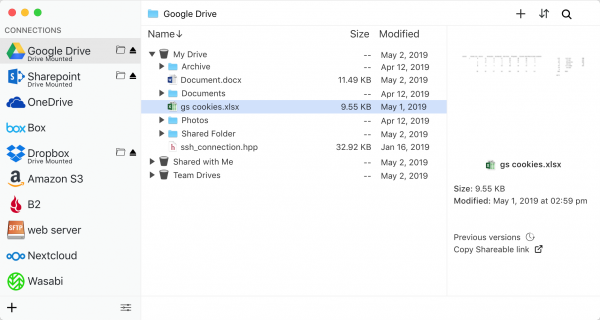
You can define several connection sources and thus very easily move files from one cloud to another, or from local storage to the cloud and vice versa. The sharing functions available for practically all providers are found in the interface, as well as indexed search and, in some cases, file version management. These interactions can be available whatever the remote storage system connected via ExpanDrive.
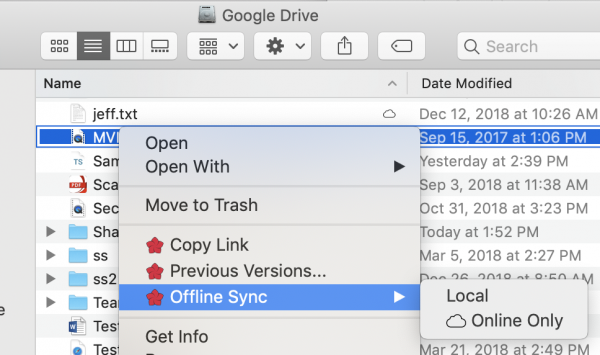
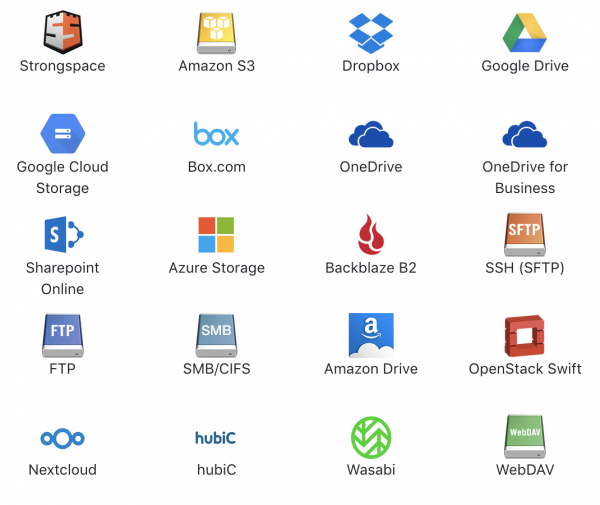
With the Smart Offline Sync feature, you choose files for offline access and work without an Internet connection. Synchronisation with the cloud takes place automatically when you are connected again. The other files are accessible on demand from the cloud, taking up no disk space. As mentioned, it is possible to provide access to several cloud providers, but also to FTP, WebDAV or SMB servers over the Internet. Here is the list of supported systems:
Having installed the solution in a remote desktop environment, I was easily able to use it as a replacement for a traditional file server. As the context can be multi-user, it can be deployed on Windows, Linux or Mac OS X alike. The unit price is around $50, which remains more than reasonable given what this product can do. The other advantage is that, in an outsourced infrastructure, you can have a virtual desktop environment with one provider and shared storage with another, without any risk of conflict between the service providers.
Here is a short video presenting the product:
We are now going to take another approach: offering internal storage… to the cloud! It may seem complicated and risky, but you will see that with the next product we are going to discuss, it is child’s play.
To do this, we are going to talk about FSNO from AvePoint. To sum up this product: it presents a set of shares from internal file servers… via SharePoint Online in Office 365. It may seem tricky to set up, but it is actually quite simple. A quick video tour:
As you can see, getting started is easy and can provide a viable answer for all companies that do not want to store their data in public clouds. It is also a solution that can make it easier to adopt cloud services while complying with the legislation in force in certain countries.
In short: everything can be presented!
Here we discover 2 products that meet the need to access our data from different standpoints. It is important to point out that these professional solutions remain very affordable and do not require large infrastructures to run. You do not need extensive knowledge to install and use ExpanDrive or FSNO, and these solutions can help with adopting cloud services without blowing your budgets or the security of your environment. What’s more, for ordinary users, everything is still presented in a simple and intuitive way, without compromising collaboration and the sharing (internal or external) of data.