iPad Pro vs Surface Pro: the battle
· Michel Aguilera
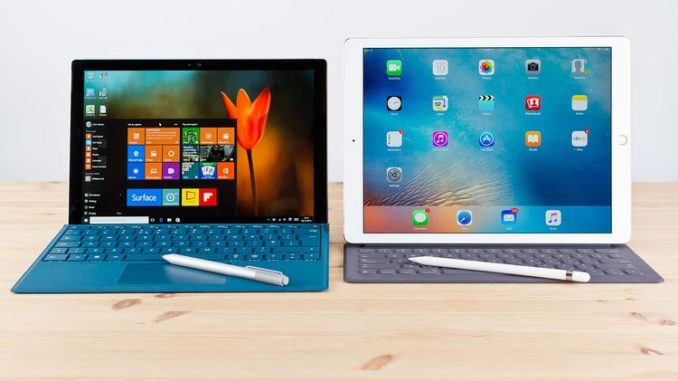
It may seem trivial, but yes, I asked myself this question: which of these 2 products can best meet my everyday needs? Between Apple’s product and Microsoft’s, which one can claim to be the most flexible, the best suited and also the longest-lasting (in terms of battery)? We will try to answer this question throughout this article, not only by comparing the 2 products but also by taking a very practical approach, based on my own experience of using both types of device. A dive into the daily life of a nomad in search of the best device.
I move… Therefore I am!
A fan of Apple products but also a Microsoft trainer, I owed it to myself to form a real opinion. So I set out to compare which of the 2 devices would best meet my daily uses. On one side, an iPad Pro 10.5 with 256 GB of storage, Wi-Fi; and on the other, a Surface Pro Gen5 with 8 GB of RAM and 256 GB of storage, with an Intel i5 processor. Both devices are equipped with their respective styluses (optional accessories, for those who might be wondering). The Surface has a keyboard Cover with TrackPad and backlighting, which attaches via a special magnetic connector. For the iPad Pro, I use a Logitech keyboard case, mentioned in my previous article on the iPad Pro 10.5.
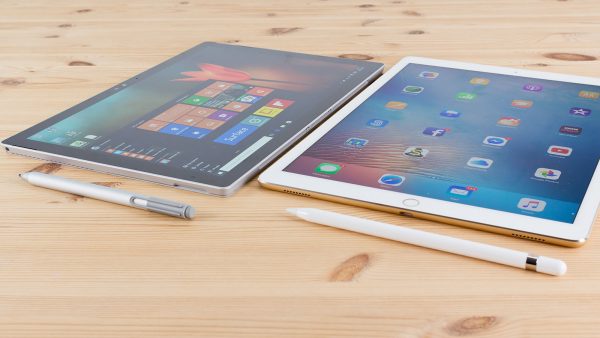
You cannot compare these 2 products without mentioning their respective operating systems: iOS versus Windows 10. The 2 have very different approaches, both in terms of functionality and in how updates are managed (on iOS, apart from regular app updates, there are few changes to the OS). On Windows 10, security updates are much more frequent. Added to this is support for connectivity and the use of third-party devices (a glaring example: printers). Yes! I still use paper from time to time, and here, no surprises: with Windows 10, connecting a printer is much easier (with the iPad, you absolutely need AirPrint support to get anything equivalent).
As far as Bluetooth connectivity is concerned, there is no major difference (unless you like using a mouse). Natively supported in Windows 10 (either via the keyboard’s TrackPad or with a mouse paired via Bluetooth or USB), this accessory is less straightforward to use with an iPad. When it comes to connecting either one to an external screen, on one side you have to use a plethora of dongles (those little hardware extensions that convert the connection depending on the type of plug your external display requires) and, on the other, there is only one possible connector (Mini DisplayPort), for which universal adapters are available. And if you want to do it wirelessly, both the iPad Pro and the Surface use proprietary solutions: AirPlay for iOS and Miracast for the Surface. Few devices have AirPlay built in, and Miracast can be used via a dedicated device.
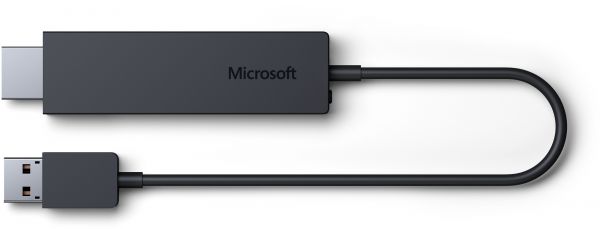
For those who want to do the same with an iPad Pro, you will need an Apple TV (much more expensive than the Miracast dongle). A short explanatory video:
So we can see that price can also be an important factor but, once again, compared with the price of an Apple TV, the Miracast option remains affordable.
For more specific uses, we can compare the versions of certain software, notably Office (available on iOS and on PC). The PC version is richer in terms of features and interaction possibilities. Here is a video (in English) of someone talking about it, based on the use of OneNote, Microsoft’s note-taking tool.
What makes me find the Surface Pro more flexible is above all the docking station available to extend the capabilities of this PC/tablet. A short video (in English) presenting it:
As you can see, it turns the Surface Pro into a genuine desktop PC, wide open to various connections and peripherals. On the iPad Pro side, there are options too, via a similar Dock.
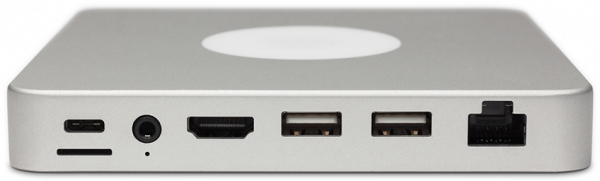
Still an Indiegogo project, this concept will allow iOS devices to rival the Surface Pro in terms of the variety of connections. A short video demo:
In short, which one wins?
It must be said that when it comes to starting up and waking from sleep, the iPad Pro remains unbeatable. The wealth of apps available in the App Store is still the benchmark of the mobile world, with a recognised ecosystem. If your mobile activities do not require a setup that depends on other peripherals and you are “full cloud”, then the iPad Pro will meet your expectations. If, on the other hand, your needs lean towards greater openness and the use of “real” desktop applications, then go for the Surface Pro.
I recommend avoiding “entry-level” configurations, which risk being disappointing. Plan for at least 8 GB of RAM, 256 GB of storage and at least the version with an Intel Core i5. If we had to sum up this hands-on experience: the iPad Pro is the tablet that wants to act like a computer, and the Surface Pro is a computer with the look of a tablet. Both devices won me over and I manage to find a daily use for both.