Copilot, the month in 5 minutes — October 2026
· Michel Aguilera
“ Copilotseries, the month in 5 minutes“ · Issue n° 1 · Reading: 5 min
New names, badged agents and a big clean-up in SharePoint
Welcome to the first edition of this series. Once a month, I sort through Microsoft Copilot news and keep what matters to partners, MSPs, and IT leaders. Five minutes, not one more.
I thought I would take a breather after the new app Copilot at the end of September. Missed: October was very busy, and not only for resellers.
At a glance
- Licenses : current offers become “(add-on)”. On December 1st, new offers without a basic subscription and pay-as-you-go billing enabled by default in CSP.
- SharePoint : Copilot and agents build a team knowledge base (Frontier tenants).
- Agents : Copilot Studio gives them a Microsoft 365account, memory, and triggers.
- Migration : .agent agents stop at the end of March 2027, the Copilot Studio app in Teams disappears in February.
- Business and management : legal, sales and ERP plugins in Cowork, export of metrics from the Copilot Dashboard.
1. Licenses: Your quotes Copilot change their name
As of October 16, current offers that require a basic Microsoft 365 subscription have the suffix “(add-on)”: “ Microsoft 365 Copilot (add-on)“ and “ Microsoft 365 Copilot Business (add-on)“. On December 1, offers that can be purchased without a basic subscription, in all channels including CSP, with their own product IDs and SKUs, at the same price (Partner Center, October announcements).
A nuance that will come up again in the meeting: the end of the CSP sale of add-on offers, on December 1st, is not an end of life. Renewing and adjusting the seats remains possible.
Same date: usage-based billing will be activated by default on new Copilot Business licenses purchased in CSP, capped by default at 4,000 Copilot Credits per user per month. France, Germany and Italy are excluded at the outset, but not Switzerland: in our country, we are preparing for it now.
To put it simply: If your quotes scripts or templates rely on product names, reconnect them to IDs and SKUs.
2. SharePoint becomes the team’s memory
In the Frontier tenants, Copilot and agents can now create and enrich a team knowledge base : a library of linked Markdown files, compiled by Work IQ from emails, messages, meetings, and documents. Microsoft claims, based on its internal testing, responses that are up to 4x faster and 30% more token-efficient. Reserved for users enabled for pay-as-you-go billing.
Copilot in SharePoint is now generally available, and Copilot Search in SharePoint and OneDrive is coming (preview in October, GA in January 2027). My ideal demo: tidy content makes for better agents. Much more meaningful than a governance slide.
▶ Understanding Work IQ, the layer that compiles this foundation: a clear overview (May 2026). Microsoft Mechanics, 9:16
3. Agents who have their own badge
On October 15, Copilot Studio presented three new features via the Frontier program (Copilot Studio blog). Agent accounts: the agent has his own identifiers Microsoft 365, he is solicited in Teams or Outlook, his actions are assigned to him. Process memory, which keeps the context from one cycle to the next. And triggers: an email or a cadence is enough to launch the agent, without a new prompt.
On the Dataverse side, agent users linked to an agent identity Microsoft Entra receive roles at the least privilege, with auditing of their actions. This is what CIOs expect before letting an agent write to business data. The only downside is that an agent that is always active consumes, so we talk about Copilot Credits from the demo.
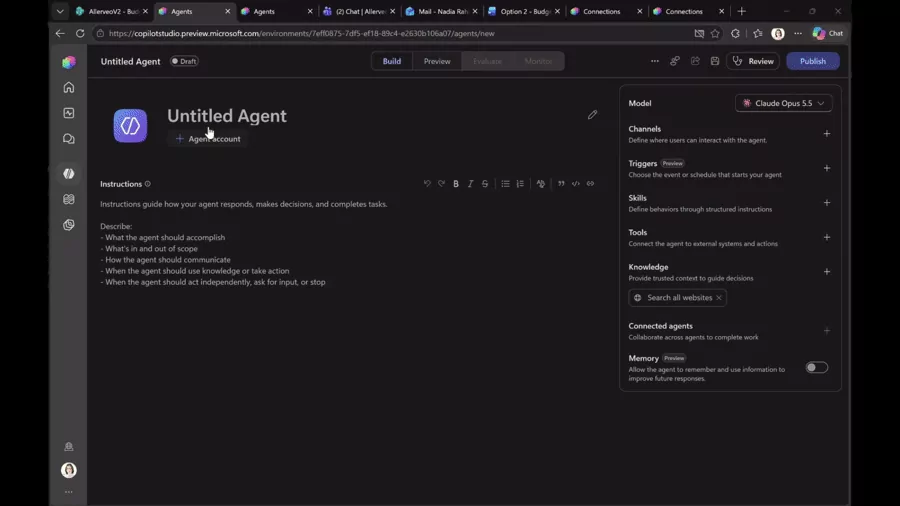
Create an agent account in Copilot Studio: name, email address, and job title, just like a collaborator.
Source: Microsoft – Delegate shared business processes to agents that are more persistent and proactive
▶ To prepare for a lab, this demo on October 5 shows a complete scenario: an agent, an email-triggered workflow, and an app. Microsoft Mechanics, 9:56
4. Cleanup: .agent files and the Studio app in Teams
Two announcements on October 17 will generate work. In SharePoint and OneDrive, “Create Agent” will open the Agent Builder in mid-November, instead of creating .agent (MC1511052) files. Older agents will stop at the end of March 2027. An “Upgrade to M365 Agent” button helps with migration, but migrated agents must be re-added in Teamschats and channels.
And the Copilot Studio app in Teams is going away (MC1511056): no more edition in January 2027, withdrawal in February, everything goes through the web app. For an MSP, the offer is ready: inventory of agents, migration before March. And training materials to be redone, including mine.
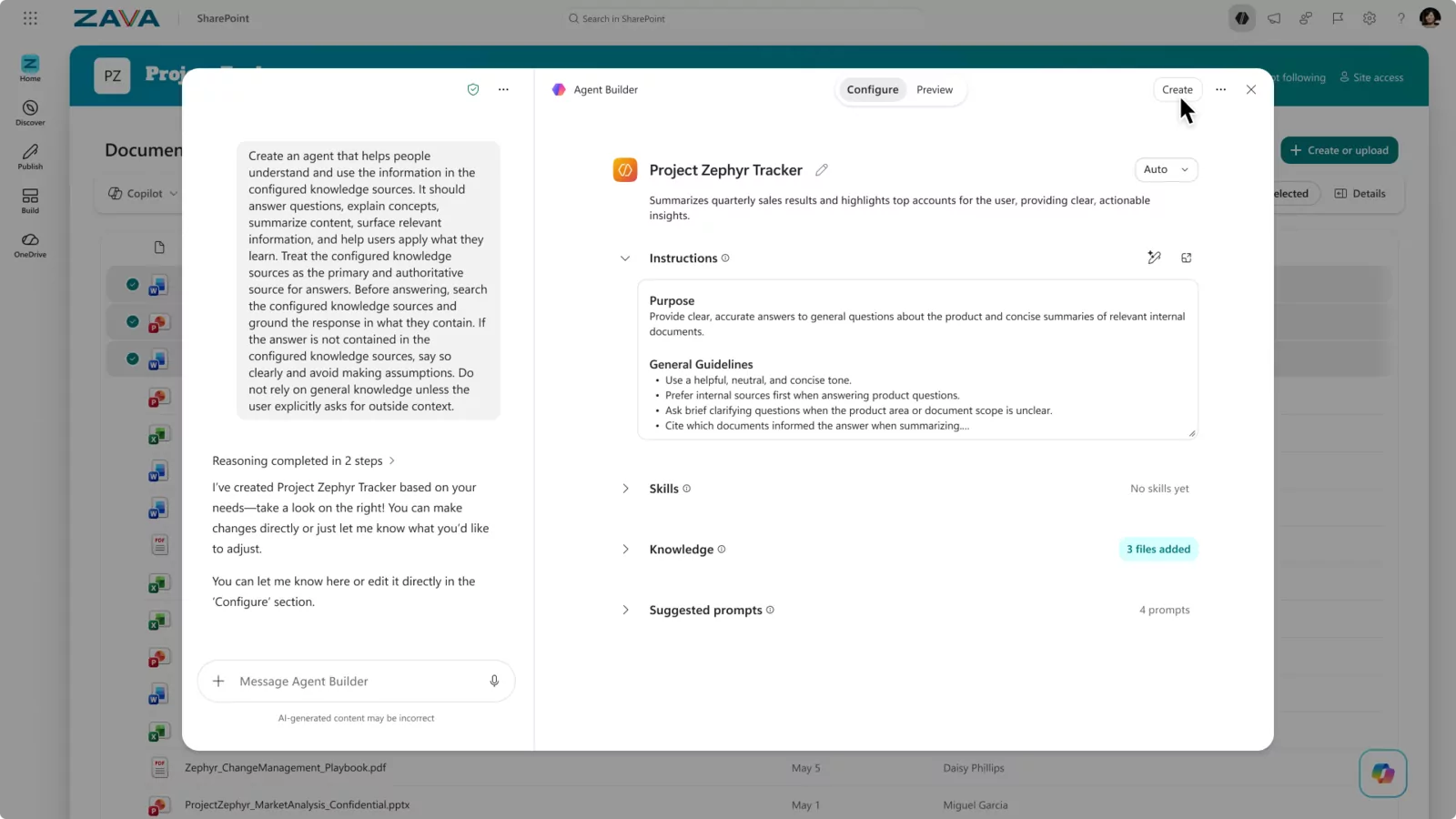
The Agent Builder in SharePoint : This will replace the creation of .agent files.
Source: Microsoft – Get started with agents in SharePoint
5. Legal, sales, ERP: business plugins are coming
The Legal Agent gives way to two legal plugins, for Word and for Cowork, with more than 20 skills for summarizing, drafting, reviewing and annotating contracts (MC1509799). In Word, it is activated by default; in Cowork, it is the user who adds it. Publishers follow, from iManage to Docusign and Harvey.
Cowork also receives the Dynamics 365 Sales plugin, installed by default (RM576850), and a Finance & Operations ERP plugin in preview. What I like: the customer keeps his tools and connects them to Copilot, without yet another platform.
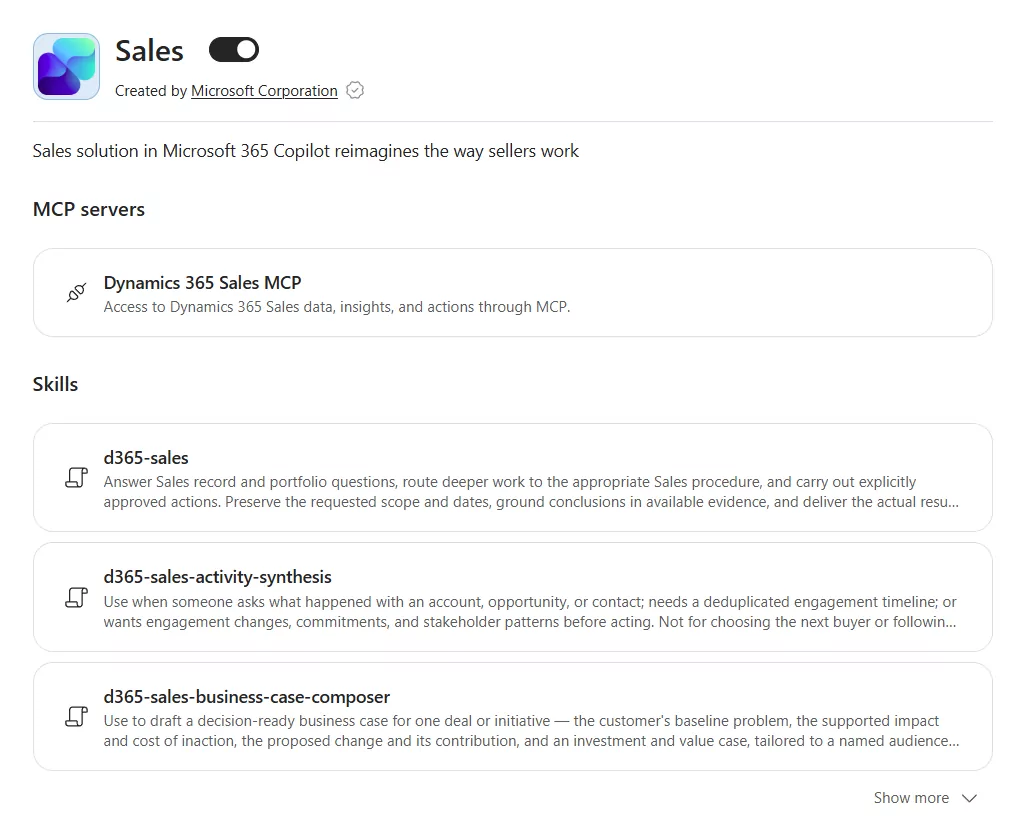
The Dynamics 365 Sales plugin in Cowork: an MCP server and a series of ready-to-use skills.
Source: Microsoft – Use sales skills in Copilot Cowork
▶ The video cited by the Learn page of the Sales plugin starts here in the chapter Copilot Cowork (4:30): Updating the CRM and preparing for an appointment (July 2026). Microsoft Mechanics, 10:24
6. To govern and measure, without spending the night
Finally , the Learn “Manage Copilot Code for your organization “ page lists the controls and their defaults: auto-approval enabled, GitHub login disabled, organization data allowed in the cloud but not on-premises. An MVP observes other values in the field: check your tenant.
For measurement, the Copilot Dashboard exports de-identified usage metrics, per week over six months or per day over 28 days (Learn), from 50 Copilotand GA licenses between mid and late November. And Copilot Chat displays memory citations : you can see which memories have influenced an answer, and you can delete them. In training, it finally answers the famous “but why does he tell me that?”.
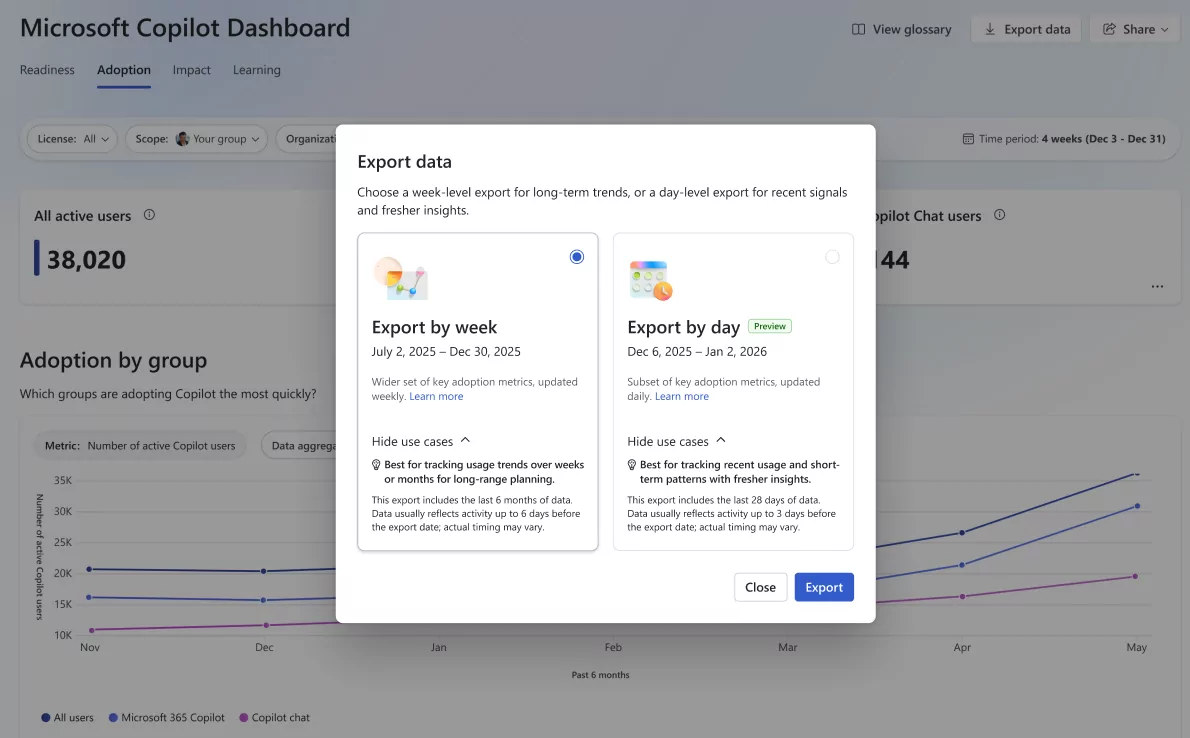
The export of the Copilot Dashboard: per week for long trends, per day (preview) for recent signals.
Source: Microsoft – Export Copilot metrics from the Microsoft Copilot Dashboard
Important Dates
| Date | What’s changing |
|---|---|
| Nov 1, 2026 | Preview of the CSP price list, with the new product IDs |
| Nov 2, 2026 | Partner Center sandbox to test pay-as-you-go billing |
| Nov 12, 2026 | Removal of models in Copilot Studio, automatic switch to “GPT Chat Latest” ( MC1506318 ) |
| Mid-Nov 2026 | The Agent Builder replaces the .agent files in SharePoint and OneDrive |
| Dec 1, 2026 | New offers without a basic subscription, end of CSP sale of “(add-ons)”, default pay-as-you-go billing (4,000 credits/user/month) |
| Jan / Feb 2027 | No more editing, then removing the Copilot Studio app in Teams |
| End of March 2027 | .agent agents stop working |
My tip of the month
Set up a FinOps point with each customer before December 1st. The cap of 4,000 credits per user is not a budget, it’s a limit. List the Copilot Business licenses that will be purchased in CSP after this date, set with the customer the cap they really want, and test in the Partner Center sandbox starting November 2nd.
And you, what are you most busy: licenses or agents? See you in November for the next edition.
To go further
- Partner Center: October 2026 Announcements
- SharePoint : A team knowledge base managed by Copilot and agents
- Copilot Studio: More persistent and proactive agents
- MC1511052: Agent Builder replaces .agent files
- Learn: Managing Copilot for Legal
Sources: Microsoft announcements (Partner Center, Learn, blogs, Message Center, and Roadmap) published until October 18, 2026. Rollout dates may still change: check your tenant’s Message Center.
Michel Aguilera
michel@aguilera.ch