Microsoft Copilot: a serious competitor for ChatGPT?
· Michel Aguilera
A lot of ink has been spilled on the subject of artificial intelligence. This time, we are going to talk about Microsoft’s foray into the field with its Copilot solution, which operates at various levels and in several of the Redmond firm’s products. A deep dive into the AI born of the collaboration with ChatGPT.
Will you be my pilot… Copilot?
Copilot is based on generative artificial intelligence, which uses a language model called ChatGPT to understand and produce text. ChatGPT is a model developed by OpenAI, an AI research organisation with which Microsoft has a partnership. ChatGPT is capable of generating coherent and relevant text from a word, a sentence or a paragraph.
Microsoft Copilot helps you carry out your daily tasks more easily and efficiently. It can provide you with information, suggestions, summaries, translations, images and much more, depending on the context and your needs. Copilot is available in several Microsoft products, such as Windows 11, Microsoft Edge and Microsoft 365. Here are a few examples of what Copilot can do for you:
- In Windows 11, Copilot can help you manage your settings, applications, files, devices and security. It can also help you personalise your Windows experience, solve common problems and discover new features. To access Copilot in Windows 11, simply click on the Copilot icon in the taskbar or say “Hey Copilot” if you have enabled voice recognition
- In Microsoft Edge, Copilot can help you browse the web, search for information, summarise web pages, translate text, create images and share content. It can also help you protect your privacy, keep track of your spending, manage your tabs and synchronise your devices. To access Copilot in Microsoft Edge, simply click on the Copilot icon in the address bar or say “Hey Copilot” if you have enabled voice recognition
- In Microsoft 365, Copilot can help you optimise your productivity, creativity and collaboration. It can help you write documents, create presentations, analyse data, organise meetings, manage projects, communicate with your colleagues and learn new skills. Copilot is built into several Microsoft 365 applications, such as Word, PowerPoint, Excel, Outlook, Teams, Loop and others. To access Copilot in Microsoft 365, simply click on the Copilot icon in the ribbon or say “Hey Copilot” if you have enabled voice recognition
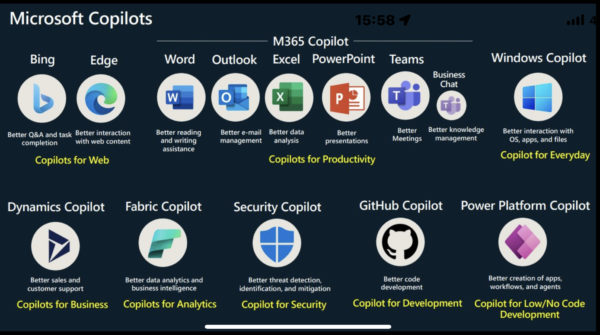
Microsoft has implemented the use of Copilot across the various layers of the solutions used by its customers. This means that the way the tools themselves are used is going to change drastically in the coming months.
Copilot Pro is a premium subscription that gives you access to the most advanced features and capabilities of Copilot, an AI-based intelligent assistant that helps you find the right information, create unique content and get things done faster.
With Copilot Pro, you can:
- Use Copilot on the web and on Windows, macOS, iPadOS, iOS and Android
- Access Copilot in certain Microsoft 365 applications, such as Word, Excel, PowerPoint, Outlook and OneNote, to write documents, summarise e-mails, create presentations, etc.
- Get priority access to GPT-4 and GPT-4 Turbo, the latest and most powerful AI models, especially during peak hours
- Create AI images with DALL-E 3 in landscape format even faster, with 100 boosts per day with Designer (formerly Bing Image Creator)
- Create your own custom Copilot GPT tailored to a specific topic in the Copilot GPT Builder (coming soon)
The price of Copilot Pro is CHF 21.00 per user/month. To get this feature, you need a free Microsoft account and an active Microsoft 365 Personal or Family subscription.
For more information, you can consult the following sites:
- Copilot Pro pricing and plan
- Microsoft extends the availability of Copilot to the general public and to all organisations
- Get started with Microsoft Copilot Pro
Launch video for the new version, named Copilot Pro, opening up access to AI in Microsoft 365 for all types of users:
Microsoft offers you the use of Copilot within Windows 11 (based on what was formerly Bing Chat).
Here are some of the advantages of Copilot in Windows 11:
- You can use Copilot to find answers to your questions, reliable sources, images, videos, maps and more on the web.
- You can generate creative and innovative content, such as poems, stories, code, essays, songs, celebrity parodies and more, using your own words and knowledge.
- You can improve your productivity and collaboration by easily sharing your files, notes, ideas and comments with other people.
- You can use Copilot to help you focus on your work, by enabling Do Not Disturb mode, scheduling focus sessions, reducing distractions and optimising your workspace.
To benefit from Copilot, you need version 23H2 of the Windows 11 update. If you want to carry out the preview setup of Windows Copilot, here is what to do:
To enable Copilot in Windows 11, you first need to join the Windows Insider Program and select the Preview channel. Here is how to go about it:
- Open Windows 11 Settings, then go to the Windows Update section
- Click on Windows Insider Program, then on the Get started button
- If you have not already done so, sign in to your Microsoft account
- Select the Preview channel, then click on Confirm
- Restart your PC
Once you have restarted your PC, you can access Copilot by pressing the Windows key + C or by clicking on the Copilot icon in the taskbar. You can then start using Copilot to search, create, collaborate and focus.
In short, are we in good hands with our (co)pilot?
With all these various launches, we can see that Microsoft has clearly decided to make 2024 the year of AI, and Copilot will be present at several levels in the firm’s products. We can bet that this will allow users to become more efficient, but it will have to go through a phase of adaptation and acceptance by the general public. Use cases will also be needed to enrich the AI’s skills in the future.